

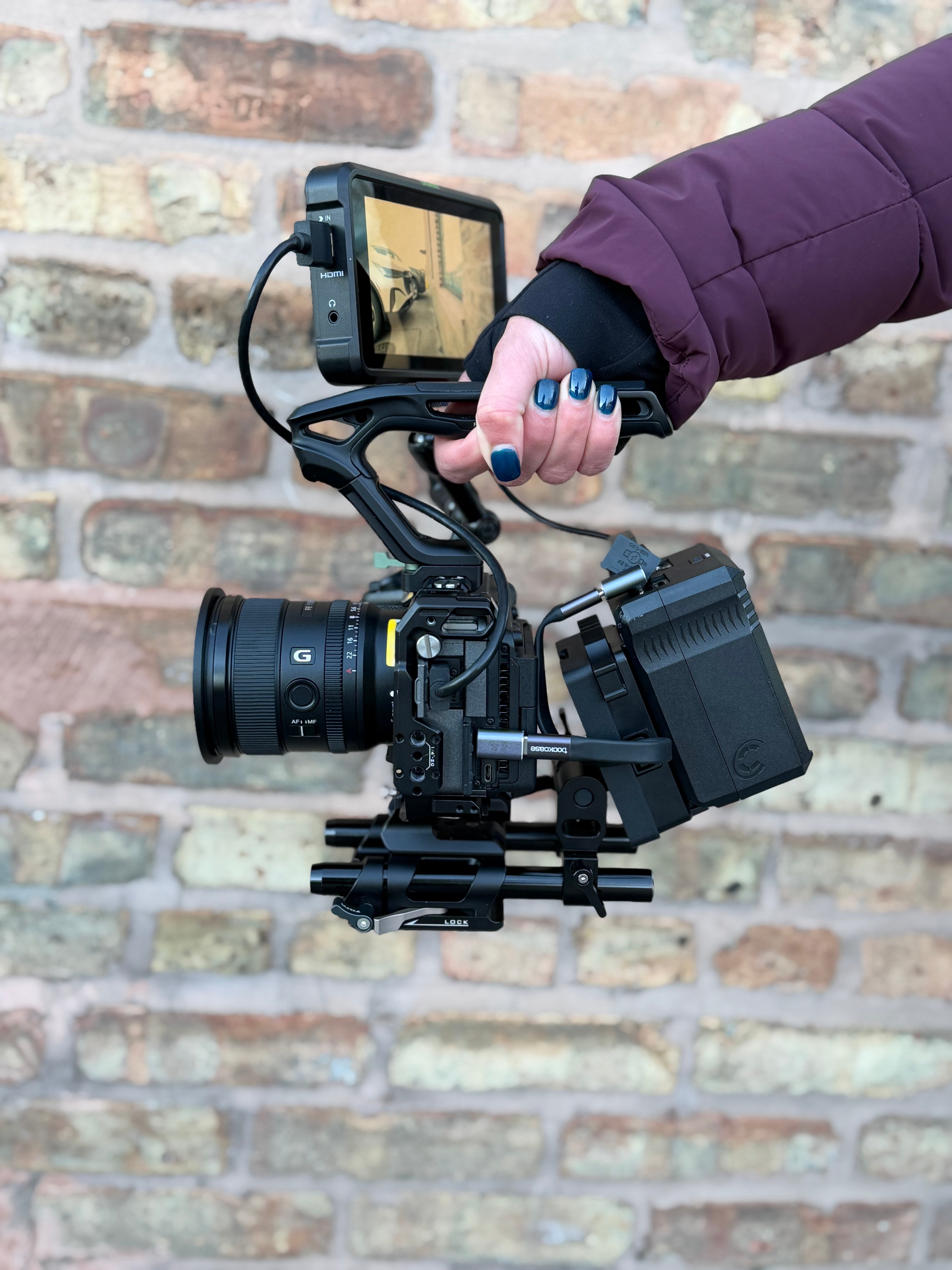
The Sony FX3 is one of the most popular cinema cameras for creators who want full-frame video quality in a compact body. But as productions grow, plenty of filmmakers run into the same issue: battery life.
That’s where V-mount batteries come in. By adding an external power solution like the ones from Core SWX, including the Core SWX Nano X and Core SWX XCell lines, you can turn the FX3 into a production-ready tool that runs longer, powers accessories, and keeps your shoot moving.

What Is a V-Mount Battery?
A V-mount battery is a professional cinema battery that attaches to equipment using a V-shaped mounting plate. You’ll see them on broadcast cameras, cinema rigs, monitors, and lighting setups.
Compared to standard camera batteries, V-mounts:
● Hold much larger capacity (watt-hours)
● Power multiple devices at once
● Provide consistent voltage output
● Are designed for long production days
For filmmakers working with external monitors, wireless transmitters, or follow-focus systems, V-mount power becomes the backbone of the entire rig.
The V-mount plate also acts as a central power hub, allowing you to power:
● The camera
● External monitors
● Wireless video transmitters
● Follow-focus motors
This makes V-mount batteries essential for any filmmaker looking to stay powered and efficient on set.

Sony FX3 Battery Life: Internal vs External
Out of the box, the Sony FX3 uses NP-FZ100 internal batteries. They’re great for portability, but runtime can be limited during longer shoots.
Typical runtime with internal batteries:
● 90–120 minutes of continuous recording (depending on settings)
● Less if powering accessories like HDMI monitors
For quick handheld work or travel shooting, internal batteries are perfectly fine. But once you’re building a full rig, swapping batteries every hour can slow down production. That’s why many creators switch to external V-mount power.
How Long Does a V-Mount Battery Last on the FX3?

Runtime depends on the battery capacity (Wh) and what gear you’re powering.
Here’s a general guideline:
Battery Capacity Approximate FX3 Runtime
98Wh V-mount ~6–8 hours
150Wh V-mount ~10–12 hours
If you're also powering accessories like a monitor or wireless transmitter, runtime will be slightly lower.
Compact batteries like the Nano-X series are especially popular for FX3 rigs because they deliver professional power without adding excessive weight.
Why Use V-Mount Instead of Standard Camera Batteries?
For professional video production, V-mount batteries solve several common power challenges.
Longer runtime
Instead of swapping batteries every hour, one battery can power your camera most of the day.
Power accessories
Many filmmaking setups require multiple devices running at once.
Better rig balance
Mounting a battery on the back of a rig can actually improve balance when using heavier
lenses.
More reliable power
Professional batteries are designed for consistent voltage and demanding production
environments.

How to Run a V-Mount Battery to the FX3
Connecting a V-mount battery to the FX3 is straightforward with the right setup.
Most rigs follow this structure:
1. V-Mount Plate mounted to rods or a cage
2. D-Tap to USB-C or D-Tap to dummy battery cable
3. Battery mounted on the back of the rig
Batteries like those from Core SWX often include multiple power outputs, making it easy to distribute power across your entire setup.

Turning the FX3 Into a Production-Ready Rig
The Sony FX3 is small, but with the right power system it can function like a much larger cinema camera. It allows you to shoot longer interviews, power multiple accessories, reduce downtime from battery swaps, and overall build a true professional rig.
For creators who are moving from solo shooting into larger productions, upgrading to a V-mount system (like the compact options from Core SWX) can be one of the most impactful rig upgrades you make.
Because when power isn’t a limitation, your creativity isn’t either!

Share:
Why Mobile Filmmaking Rigs Need Proper Power (And How to Do It) | Beastgrip × Core SWX
iPhone Filmmaking Guide: Batteries, Runtime & Rig Setup